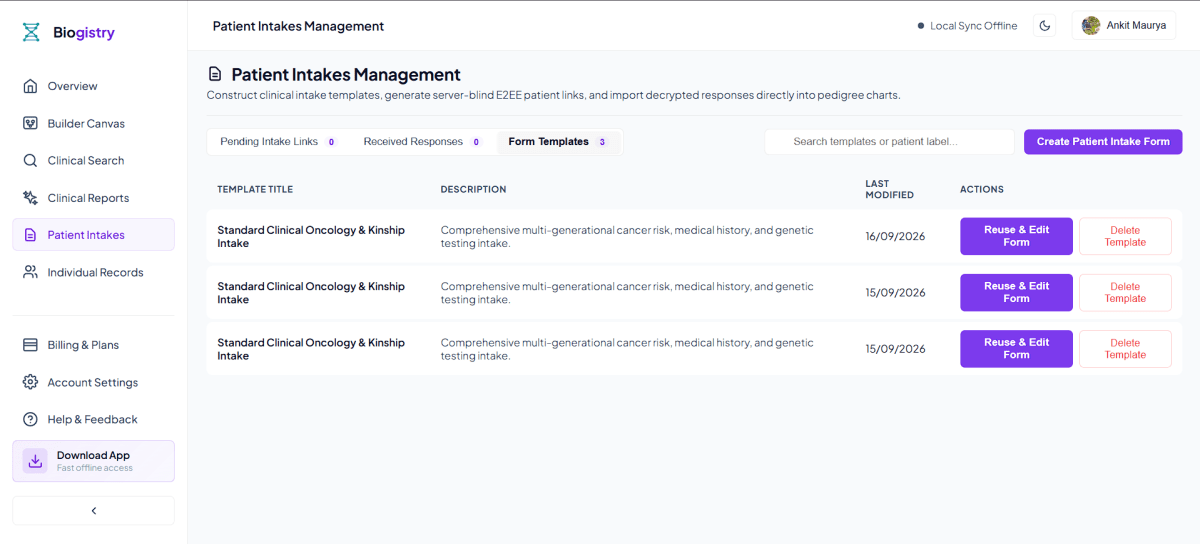
Complete Zero-Trust Patient Intake to Pedigree Builder for Medical Genetics
Collecting accurate, multi-generational family health history is one of the most critical yet time-consuming tasks in medical genetics, oncology, prenatal care, and cardiology consultations. Genetic counselors and clinical geneticists spend up to 30 minutes per consultation manually interviewing patients, drawing pedigree symbols on paper, and re-keying demographic data into electronic health records and standalone risk calculators.
Traditional digital intake tools fail to solve this bottleneck. Paper questionnaires require manual transcription, introducing data entry errors and legibility issues. Standard web forms save patient responses in unencrypted central databases, exposing Protected Health Information (PHI) to cloud data breaches and HIPAA compliance violations. Furthermore, generic survey software outputs static spreadsheets rather than standardized pedigree diagrams, forcing clinicians to re-draw family trees manually from scratch.
Biogistry overcomes these clinical documentation hurdles with the Zero-Trust Patient Intake to Pedigree Builder. Designed specifically for healthcare providers and medical genetics clinics, our intake engine allows patients to complete intuitive family history questionnaires on any mobile or desktop device. The moment an intake form is submitted, Biogistry automatically converts raw patient answers into a standardized, publication-ready family pedigree chart rendered locally on your workstation canvas with zero double data entry and zero central server PHI storage.
The Clinical Intake Bottleneck and Why Legacy Solutions Fail
Modern clinical genetics practice requires thorough documentation of ancestral lineage, carrier statuses, cancer diagnoses, and age of disease onset across three or more generations. However, legacy patient intake methods introduce five major clinical obstacles:
1. Manual Transcription Fatigue and Human Error
When patients fill out paper questionnaires in clinic waiting rooms, staff must manually transcribe written names, dates of birth, disease types, and ages of onset into clinical notes. Keying errors during manual transcription can lead to incorrect risk stratification, missed genetic testing criteria, or miscalculated inheritance probabilities.
2. Double Data Entry Across Disparate Clinical Tools
In legacy workflows, clinicians enter patient information multiple times: first on a paper intake form, second into an EHR progress note, third into standalone pedigree drawing software, and fourth into external risk calculation tools. This redundant data entry wastes valuable clinical consultation time that should be spent on patient counseling.
3. Static Spreadsheets Instead of Standardized Pedigree Graphs
Generic online form builders collect survey data into flat tabular spreadsheets. Spreadsheets cannot represent complex biological kinship loops, consanguineous marriages, twin zygosities, or multi-generational descent lines, forcing genetic counselors to decipher raw text tables and draw family trees by hand.
4. Third-Party Cloud Data Storage and HIPAA Vulnerabilities
Uploading unencrypted patient health history, medical record numbers, and family cancer histories to commercial cloud survey servers creates severe regulatory compliance risks. Centralized cloud databases represent high-value targets for cyberattacks and unauthorized data mining.
5. Patient Usability Barriers on Mobile Devices
Complex medical intake forms often overwhelm patients with confusing technical terminology and rigid layouts. If an intake form is difficult to navigate on a smartphone, completion rates drop, leaving clinicians with incomplete family history data prior to patient appointments.
How Patient Intake Happens Without Central Server Data Holding: The Sealed Envelope Questionnaire Analogy
A fundamental requirement of modern healthcare technology is ensuring patient privacy without sacrificing digital convenience. A common misconception is that receiving an online patient intake form requires a central server to store, read, and process unencrypted patient health records. In traditional web forms, a central cloud database receives raw text answers, stores readable patient data on cloud hard drives, and parses names and medical conditions for server-side processing.
Biogistry completely eliminates this privacy risk by operating under a Zero-Trust Sealed Relay Architecture. The central server never holds, reads, or stores readable patient health records.
| Stage | System Entity | Encryption & Data Boundary | Security & Privacy Guarantee |
|---|---|---|---|
| 1. Local Key Generation | Clinician Workstation Browser | Generates 256-bit AES-GCM key in volatile browser memory | Key remains local to client session; zero plaintext key sent to server |
| 2. Ephemeral Link Creation | Secure Intake Link | Key embedded exclusively in URL hash fragment (#k=...) |
HTTP protocol dictates browsers never send URL hash to web servers |
| 3. Patient Intake Completion | Patient Device Browser | Patient completes questionnaire on smartphone or computer | All answers encrypted in patient browser memory prior to submission |
| 4. Opaque Payload Transfer | Sealed Binary Envelope | Encrypted payload (Uint8Array) transmitted with 12-byte IV |
Data formatted as unreadable binary blob during network transit |
| 5. Blind Server Relay | Central Relay Server | Stores temporary binary blob linked to ephemeral session ID | Server acts as blind courier; holds zero keys and cannot read contents |
| 6. Local Pedigree Hydration | Clinician Workstation Canvas | Clinician browser fetches binary blob and decrypts using URL key | Decryption occurs strictly inside workstation memory; auto-builds chart |
The Sealed Envelope Questionnaire Analogy
To understand how Biogistry processes patient intake forms without storing or reading your data on central servers, consider the Sealed Envelope Questionnaire Analogy:
- The Private Lock and Key: Imagine a clinician preparing a locked metal box and giving a duplicate physical key to a patient. Only the clinician and patient hold keys to open the box.
- Local Patient Filing: The patient fills out their family health history questionnaire inside a private room (their local web browser). When finished, the patient places their completed questionnaire inside the metal box, locks it with their key (AES-256-GCM encryption in browser memory), and hands the locked box to a courier service (Biogistry central server).
- The Blind Courier Relay: The courier service transports the locked metal box from the patient to the clinician. The courier cannot pick the lock, possesses zero keys, and cannot see inside the box. The courier simply holds the locked box until the clinician retrieves it.
- Local Workstation Unlocking: The clinician receives the locked metal box and turns their private key (stored strictly in their browser memory URL hash fragment) to unlock the box. The clinician browser reads the decrypted family data and automatically draws the standardized pedigree tree on screen.
- Zero Server Footprint: Once the clinician retrieves the locked box, the temporary binary envelope is cleared from the courier relay. At no point during transmission or storage did the courier service have the ability to open the box, read patient names, or view family diagnoses.
Under this zero-trust model, your workstation browser is the sole decrypting authority. Central servers act strictly as blind digital couriers, holding zero plaintext data, zero decryption keys, and zero readable patient health records.
Detailed Data Security and Zero-Trust Processing Matrix
The following specifications detail how patient intake data is handled across every stage of the questionnaire and pedigree hydration workflow:
| Workflow Stage | Data Processing Action | Local Execution & Encryption Boundary | Security & Compliance Guarantee |
|---|---|---|---|
| Intake Link Minting | Clinician creates custom intake room link | 256-bit AES-GCM key generated in client browser memory | Secret key placed in URL hash fragment (#k=...); never sent to servers |
| Patient Form Delivery | Patient opens intake URL on mobile device | Questionnaire interface loaded into patient browser memory | Form template fields rendered locally without downloading patient records |
| Relative Entry | Patient inputs parents, siblings, children, aunts, uncles | Relative topology nodes created in patient device memory | Data kept strictly in volatile client memory during entry |
| Diagnosis Recording | Patient records cancer types, onset ages, health conditions | Diagnostic conditions attached to specific topology nodes | Conditions mapped to standardized clinical categories in browser |
| Payload Submission | Patient submits completed questionnaire | Form state encrypted locally via AES-256-GCM with 12-byte IV | Unreadable binary payload (Uint8Array) sent to ephemeral relay |
| Ephemeral Relay Storage | Relay receives opaque encrypted binary blob | Temporary binary payload stored in encrypted ephemeral relay database | Relay holds zero keys, zero plaintext data, and zero readable PHI |
| Clinician Retrieval | Clinician opens workspace session | Browser fetches opaque binary payload using ephemeral room ID | Payload retrieved over secure TLS network channel |
| Client Decryption | Clinician browser decrypts binary payload | Decrypted locally in browser memory using URL hash fragment key | Decryption happens entirely inside client memory with zero cloud leaks |
| Pedigree Hydration | Decrypted topology mapped to Pedigree canvas | Generational BFS placement & overlap resolution auto-draws chart | Standardized NSGC/ACMG pedigree graph ready instantly for review |
Form Builder Customization: Tailoring Questionnaires for Clinical Specialties
Every medical genetics clinic maintains specific documentation protocols based on their patient population. Biogistry provides a three-step Clinical Intake Form Builder - a full-screen wizard that lets clinicians design bespoke patient questionnaires without writing a single line of code. Drafts are auto-saved to browser localStorage, and a gate validation system prevents an incomplete topology from advancing to later steps.
Step 1: Family Tree Graph Topology Builder
The first wizard screen is a visual graph builder where clinicians compose the family tree skeleton that patients will see. Starting from a locked Proband (Index Patient) anchor node, clinicians add relative primitives - biological father, biological mother, partner/spouse, children, and siblings - by selecting any node in the panel and clicking the corresponding action button. Each new node is automatically connected via kinship union records, and the system prevents illogical structures (e.g., adding a second biological mother to a node that already has one). The topology nodes and their union pairings are stored as a declarative blueprint, not a visual diagram, keeping the data structure clean and importable.
A gate validation check runs continuously: the wizard will not advance to Step 2 unless the topology contains exactly one Proband node with at minimum a Name and Biological Sex question attached to it. If the gate fails, a prominent alert banner describes the specific validation failure.
Step 2: Question Attacher
Once the family tree skeleton is confirmed, Step 2 lets clinicians attach clinical intake questions to individual family member nodes. Clinicians select any node from the topology panel, then browse the Master Variable Catalog - a curated library of clinical field types covering basic demographics, dates, hereditary conditions, genetic testing records, reproductive history, cardiovascular risk factors, and more. Each variable has a defaultLabel (the technical clinical term) and a customPromptLabel that clinicians can freely edit to rephrase questions in plain patient language.
For example, the technical variable condition_cancer_breast can be relabelled with a patient-facing prompt such as: "Has anyone in your biological family been diagnosed with breast cancer? If so, please specify which side of the family and their approximate age at diagnosis." Fields can be marked as Required or Optional, and each question is explicitly bound to a single family member node, ensuring answers are mapped accurately during pedigree hydration.
Step 3: Review and Generate Zero-Trust Intake Link
The final step presents a full summary of the configured template - title, description, the complete list of topology nodes, and all attached question fields - for clinician review. Clinicians can edit the template title and description before finalising. Clicking Save and Generate Intake Link simultaneously saves the template to the local Form Templates registry (with auto-timestamping) and calls the Biogistry API to mint a new ephemeral intake room. A 256-bit AES-GCM secret key is generated in the clinician's browser memory, embedded in the returned intake URL as a hash fragment, and the completed shareable link is displayed in a modal for immediate copy-and-share. The central server stores the template blueprint and a room identifier only - it never receives or holds the decryption key.
Patient User Experience: Node-by-Node Questionnaire Journey
A successful digital patient intake system must be intuitive, fast, and easy to complete on any device. Biogistry's patient-facing intake interface is engineered for high completion rates and patient clarity. Crucially, the exact questions a patient sees - and for which family members - are dictated entirely by the template the clinician designed in the Form Builder. There are no fixed "sections" hardcoded into the patient page; the interface is fully data-driven.
How the Patient Journey Works
When a patient opens their unique intake link on any device, the page loads the clinician-defined template blueprint (the family tree topology and attached question fields) from the ephemeral relay room. The patient then moves through a node-by-node stepper: each screen focuses on one specific family member at a time.
Node Sidebar Navigation
A scrollable sidebar lists every family member node the clinician included in the template topology (e.g., Index Patient, Biological Father, Biological Mother, Paternal Grandfather, Maternal Grandmother, etc.). Each sidebar item displays a real-time completion indicator: a green check for fully complete, a yellow indicator for partially answered, and a red badge for missing required fields. Patients can navigate to any node at any time - the stepper is non-linear and non-blocking.
Per-Node Question Forms
Each node screen renders exactly the questions the clinician attached to that family member in Step 2 of the Form Builder. Questions are rendered using contextual input controls matched to the field variable type:
- Name / text fields: Plain text input
- Biological Sex: Three-option pill selector (Female / Male / Other / Prefer not to say)
- Dates of birth: Native date picker
- Ages and numerical values: Number input
- Risk / status flags: Yes / No / Uncertain pill selector
- Hereditary conditions and diagnoses: A dropdown selecting affected status (Unaffected / Diagnosed with condition or cancer / Known genetic carrier), followed by a free-text tag input for entering individual condition names (e.g., Breast Cancer, Lynch Syndrome), which are stored as a structured conditions array
As the patient enters answers, labels dynamically update across the sidebar and node headers to reflect the names entered - for example, after the patient types "Rajesh" as the Index Patient's name, the Biological Father node's header will read "Biological Father of Rajesh".
All answers are auto-saved to browser localStorage continuously, so patients can safely close and reopen the link without losing progress.
Review Screen
Once the patient has addressed all nodes, advancing to the Review screen displays a full summary grouped by family member: each node's label alongside all answered fields and their values. An overall completion meter shows required fields answered vs. total required fields across the entire form. Missing required fields are highlighted with direct navigation links back to the relevant node.
Encrypted One-Click Submission
When all required fields are complete, the Submit Family History button becomes active. Clicking it triggers the complete client-side encryption pipeline: the patient's browser calls hydrateTopologyToPedigreeState to convert the node answers and topology blueprint into a fully-positioned native pedigree graph (BFS generational layout is computed on the patient device), encrypts the resulting payload using AES-256-GCM with the secret key from the URL hash fragment, and transmits the unreadable binary lockbox to the ephemeral relay. The browser's local cache for this intake session is immediately wiped, and the room is locked against further submissions.
Automated Pedigree Graph Layout Engine: Converting Questionnaire Answers into NSGC/ACMG Pedigree Canvas
The core innovation of Biogistry's intake engine is its ability to transform flat questionnaire responses into a fully positioned, standardized pedigree chart instantly upon clinician retrieval.
1. Automated Kinship Topology Mapping
When the clinician opens the decrypted intake payload on their workstation, the system maps reported relatives into biological node objects and union pairings. The kinship engine automatically links parents to children, connects spouses via partner connection bars, and constructs multi-generational relationship hierarchies without requiring manual drawing.
2. BFS Generational Placement Algorithm
To ensure standard top-to-bottom generational hierarchy, the engine executes a Breadth-First Search (BFS) generational placement pass:
- Generation 0 (Founders): Maternal and paternal grandparents are assigned to the topmost generational tier.
- Generation 1 (Parents & Aunts/Uncles): Biological parents, aunts, and uncles are positioned on the middle generational tier.
- Generation 2 (Proband & Siblings): The index patient, siblings, and spouses are placed on the primary consultation tier.
- Generation 3 (Offspring): Children and grandchildren drop down vertically onto lower generational tiers.
3. Automated Overlap Resolution and Subtree Width Shifting
In complex multi-generational families with numerous siblings and extended relatives, simple node placement can cause relationship lines to cross or symbols to overlap. Biogistry resolves this with an automated subtree width shift algorithm that calculates the visual boundary of every family sub-branch, adjusting horizontal spacing dynamically to eliminate symbol collisions while preserving clean vertical alignment.
4. NSGC and ACMG Standard Symbol Rendering
The hydrated pedigree chart automatically applies standardized cytogenetic symbol notation recommended by the National Society of Genetic Counselors (NSGC) and American College of Medical Genetics and Genomics (ACMG):
- Male Square: Rendered for male relatives.
- Female Circle: Rendered for female relatives.
- Sex Unspecified Diamond: Rendered for unspecified or unknown gender nodes.
- Proband Index Arrow: Automatically points directly to the index patient symbol.
- Deceased Slash Line: Renders a diagonal slash across symbols for deceased relatives, displaying year of death and cause of death notes.
- Quadrant Disease Shading: Applies proportional color shading across up to four quadrants on individual symbols for multi-condition family histories.
- Consanguinity Double Lines: Renders standard double horizontal lines between related partners.
- Adoption Brackets: Renders square brackets
[]around adopted individuals with dashed or solid parentage lines.
Single Intake Architecture: Zero Double Data Entry Across the Workbench
In legacy clinical software, completing a patient intake form is only the first step in a tedious documentation process. Clinicians must re-key data into separate tabs for risk calculations, carrier screening worksheets, and consultation notes.
Biogistry solves this problem with a Single Intake Architecture. The moment a patient questionnaire is decrypted and hydrated into a pedigree chart, all collected data automatically synchronizes across your active workspace session.
[PATIENT DIGITAL INTAKE] → Automated Pedigree Canvas Rendering
[PATIENT DIGITAL INTAKE] → Clinical Report & Documentation Engine
[PATIENT DIGITAL INTAKE] → Multi-Format Data & Diagram Exports
1. Seamless Multi-Tool Synchronization
- Pedigree Canvas: Visualizes generational inheritance patterns, quadrant shading, and kinship structures.
- Risk Score Engines: Automatically inputs patient age, family cancer history, biopsy results, and ethnic background into validated risk algorithms.
- Clinical Report Builder: Auto-populates patient demographics, affected relative tallies, and calculated risk scores directly into consultation progress notes using dynamic
@mention tokens.
2. Instant Recalculation on Edit
If a clinician updates a relative's diagnosis, age of onset, or genetic test result on the pedigree canvas during a patient consultation, connected risk scores and report text blocks recalculate instantaneously. This eliminates manual copy-pasting, prevents transcription errors, and saves valuable clinical time.
Concise Overview: Risk Score Calculations and Export Capabilities
Once your patient intake questionnaire is hydrated into an active pedigree workspace, Biogistry provides immediate access to validated risk models and multi-format clinical export options without requiring additional data entry.
1. Automated Risk Score Calculations (17+ Models)
After the pedigree chart is built based on your intake, you can calculate 17+ validated risk scores with a single click. Supported risk engines include:
- Hereditary Breast and Ovarian Cancer Models: Gail Model (BCRAT), Claus Model, Tyrer-Cuzick (IBIS), and BRCAPRO.
- Lynch Syndrome & Colorectal Cancer Models: PREMM5, MMRpro, and MMRpredict.
- Pancreatic & Prostate Cancer Models: PancPRO and Prostate Risk Calculators.
- Mendelian & Kinship Analysis: Bayesian Peeling, Wright's Coefficient of Inbreeding (F), Malécot Kinship Coefficient (φ), and Mendelian inheritance probability matrices.
2. Multi-Format Data and Diagram Export Ecosystem
Export your completed pedigree chart, patient records, and clinical consultation reports in high quality, publication-ready formats:
- Vector PDF Progress Notes: Print-ready A4 clinical progress notes complete with uploaded hospital letterheads, clinician credentials, and high-resolution diagram figures.
- High-Resolution Vector Graphics: Download scalable SVG vector diagrams and high-resolution PNG images for academic publications, slide presentations, and EHR attachments.
- Standardized Healthcare & Data Exchange Formats: Export full GEDCOM 5.5.1 files for legacy genealogy compatibility, FHIR R4 Bundle resources for EHR interoperability, Markdown (
.md), HTML (.html), and client-side AES-256 encrypted JSON workspace state files.
Real-World Clinical Workflows and Use Cases
Biogistry's Zero-Trust Patient Intake to Pedigree Builder adapts seamlessly to diverse clinical specialties and healthcare environments.
Scenario 1: Hereditary Breast and Ovarian Cancer Intake
A specialized breast cancer clinic sends an intake link to a 42-year-old female patient prior to her genetic counseling consultation.
- Patient Experience: The patient opens the link on her smartphone, completes the hereditary cancer questionnaire, and reports a mother diagnosed with breast cancer at age 45 and a maternal aunt diagnosed with ovarian cancer at age 52. She submits the encrypted form.
- Clinician Experience: The genetic counselor opens her workstation workspace. The browser decrypts the intake payload locally using the URL hash key and auto-draws a 3-generation NSGC-compliant pedigree chart.
- Instant Clinical Review: Without re-keying data, the counselor runs the Gail Model and Tyrer-Cuzick calculations, inserts the auto-populated pedigree snapshot into a white-labeled PDF report, and prepares consultation notes in under 4 minutes.
Scenario 2: Prenatal Carrier Screening and Fetal Risk Assessment
A maternal-fetal medicine practice evaluates a couple seeking pre-conception genetic counseling.
- Patient Experience: Both partners complete an encrypted reproductive intake form on a tablet in the clinic waiting room, recording family histories of Cystic Fibrosis and Spinal Muscular Atrophy.
- Clinician Experience: Upon opening the session, the intake engine hydrates both maternal and paternal family trees onto a unified canvas, highlighting consanguinity loops and carrier statuses.
- Instant Clinical Review: The clinician reviews carrier recurrence probabilities, attaches an autosomal recessive Punnett cross snapshot, and exports a white-labeled PDF clinical note for the couple's EHR chart.
Comparison Matrix: Legacy Patient Intake vs. Biogistry Zero-Trust Intake Builder
| Feature & Capability | Legacy Paper & Cloud Intake Forms | Biogistry Zero-Trust Intake Engine |
|---|---|---|
| Data Privacy & Security | Unencrypted cloud databases; PHI exposed to third-party servers | 100% Client-side AES-256-GCM zero-trust encryption; zero PHI cloud holding |
| Pedigree Generation | Static text spreadsheets; manual paper drawing required | Automated instant NSGC/ACMG pedigree graph hydration from intake answers |
| Data Entry Efficiency | Re-key data 3-4 times across paper, EHR, pedigree, and risk tools | Single intake architecture; zero double data entry across all tools |
| Server Holding Model | Central server stores readable patient names and health records | Sealed envelope relay model; central server holds zero decryption keys |
| Decryption Key Storage | Stored on central cloud servers or application databases | Secret key embedded strictly in URL hash fragment (#k=...); never sent to servers |
| Form Customization | Generic non-clinical survey templates | Customizable clinical variables, dynamic relative repeaters, and custom patient prompts |
| Risk Model Integration | Manual re-entry into external risk score software | 1-Click calculation of 17+ risk scores (Gail, Claus, PREMM5, Tyrer-Cuzick, Bayesian) |
| Export Formats | Flat PDF printouts or basic CSV spreadsheets | High quality PDF, SVG/PNG vector images, GEDCOM 5.5.1, FHIR R4, MD, HTML, and JSON |
Start Streamlining Patient Intake and Pedigree Construction Today
Transform your clinical genetics workflow with a fast, secure, and standardized patient intake engine. Collect encrypted family history questionnaires, generate publication-ready pedigree diagrams automatically, and protect patient privacy with complete confidence.