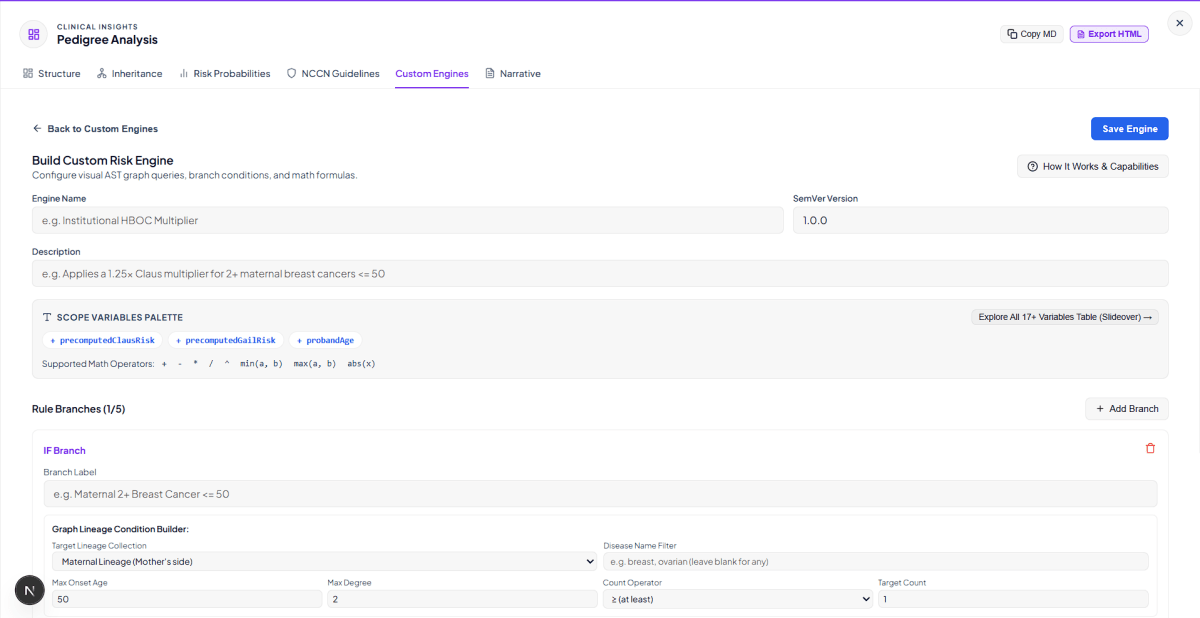
Custom Risk Models Built for the Way Your Institution Actually Works
Every genetics program has clinical logic specific to its patient population, research protocols, and institutional guidelines. A hereditary cancer center serving a founder-effect Ashkenazi Jewish community applies different risk multipliers than a university hospital serving a diverse referral base. A cardiovascular genetics program uses different family history thresholds than a Lynch syndrome surveillance clinic.
Validated population-level risk models like Gail BCRAT, Claus, or PancPRO are essential clinical tools. But they cannot capture every institution-specific formula, every research-defined patient subgroup, or every custom triage criterion a genetics team has refined over years of practice.
Biogistry Custom Clinician Scripting and Institutional Risk Engine solves this gap. It gives genetic counselors, clinical geneticists, and academic researchers a structured authoring environment to build institution-specific scoring models directly inside their workspace, without needing software engineers, cloud deployment pipelines, or patient data uploads.
Everything runs inside your browser. Patient pedigree data never leaves your device. Every calculation generates a binding cryptographic audit receipt. And institutional model versions are tracked with full copy-on-write lineage management.
The 4-Step Engine Authoring Workflow
Building a custom risk engine in Biogistry follows four clearly defined steps. Clinicians work through each step inside an inline builder screen without leaving their pedigree workspace.
| Step | Action | Outcome |
|---|---|---|
| 1. Metadata Definition | Set engine name, SemVer version, and clinical description | Creates a uniquely identified, versioned engine instance |
| 2. Visual Lineage Rule Branches | Build IF and ELSE IF conditions using point-and-click pedigree graph query controls | Defines when specific scoring logic applies based on family history |
| 3. Output Math Formula | Write a mathematical formula referencing precomputed risk scores, Bayesian posteriors, and demographics | Determines the numeric risk score when a branch condition matches |
| 4. Sandbox Live Test | Run the engine against your current active pedigree graph | Validates scores and ZKAR receipt output before saving |
Visual Pedigree Graph Rule Builder
The rule branch editor is designed so clinicians who have no programming background can build meaningful, structured family history queries using dropdown controls and number fields.
Each rule branch represents one clinical scenario. The branch is defined by a pedigree graph query condition and a scoring formula to run when that condition is true.
Graph Query Condition Controls
| Control | Options | Clinical Purpose |
|---|---|---|
| Target Lineage Collection | Maternal Lineage, Paternal Lineage, All Relatives, 1st Degree, 2nd Degree | Restricts the query to a specific subset of the family tree |
| Disease Name Filter | Free-text substring match | Filters relatives by their recorded diagnosis |
| Maximum Onset Age | Numeric age threshold | Restricts to relatives diagnosed at or before a specified age |
| Maximum Kinship Degree | 1 (first-degree) or 2 (second-degree) | Limits relatives by closeness of biological relationship |
| Count Operator | At least, more than, exactly, at most | Sets the comparison threshold for matched relative count |
| Target Count | Numeric value | The number of matching relatives required to satisfy the condition |
For example, a branch condition can be configured to match cases where two or more maternal lineage relatives were diagnosed with breast cancer at or before age 50. If that condition is satisfied, the engine applies the specified formula for that branch.
Up to five sequential branches can be defined per engine: one primary IF branch and up to four ELSE IF branches. Branches are evaluated from top to bottom. The first branch whose conditions are satisfied executes its formula. If no branch matches, the engine falls back to a default formula.
Condition Logic Within a Branch
Each branch supports up to eight individual conditions combined using AND or OR logic. This means a single branch can require, for example, two or more maternal breast cancer relatives AND one or more paternal ovarian cancer relatives simultaneously.
Scope Variable Directory: 17 or More Clinical Inputs for Formula Authoring
Custom engine formulas can reference a library of precomputed scope variables drawn from the active pedigree workspace. These variables are organized into three categories.
Cancer Risk Engine Outputs
| Variable Name | Clinical Source | Example Value |
|---|---|---|
| precomputedClausRisk | Remaining Lifetime Breast Cancer Risk (Claus 1994) | 0.185 = 18.5% |
| precomputedGailRisk | 5-Year Invasive Breast Cancer Risk (Gail NCI Model) | 0.035 = 3.5% |
| precomputedLynchRisk | Lynch Syndrome MMR Gene Carrier Probability (Kastrinos 2017) | 0.052 = 5.2% |
| precomputedOvarianRisk | Hereditary Ovarian Cancer Penetrance Risk | 0.041 = 4.1% |
| precomputedProstateRisk | Hereditary Prostate Cancer Relative Risk Score | 0.068 = 6.8% |
| precomputedChompretRisk | Chompret Li-Fraumeni Syndrome (TP53) Clinical Score | 0.120 = 12% |
| precomputedPancProRisk | PancPRO Pancreatic Ductal Adenocarcinoma Risk | 0.028 = 2.8% |
| precomputedCarrierRisk | Expanded Carrier Screening Recurrence Risk | 0.250 = 25% |
Bayesian and Mendelian Probability Outputs
| Variable Name | Clinical Source | Example Value |
|---|---|---|
| mendelianCarrierPrior | Mendelian Transmission Prior Carrier Probability | 0.500 = 50% |
| bayesianPeelingRisk | Posterior Carrier Probability after Elston-Stewart Peeling | 0.842 = 84.2% |
Pedigree Demographics and Relative Counts
| Variable Name | Clinical Source | Example Value |
|---|---|---|
| probandAge | Current Age of Index Patient in Years | 45 |
| probandSex | Biological Sex (1 = Female, 2 = Male) | 1 |
| totalFamilyMembers | Total Individual Nodes in Pedigree Graph | 18 |
| affectedRelativeCount | Total Affected Relatives Across Full Tree | 4 |
| firstDegreeAffectedCount | Affected First-Degree Relatives | 2 |
| secondDegreeAffectedCount | Affected Second-Degree Relatives | 2 |
| maternalLineageAffectedCount | Affected Relatives on Maternal Side | 3 |
| paternalLineageAffectedCount | Affected Relatives on Paternal Side | 1 |
Formula Writing: Supported Math Operations
Once a branch condition is matched, the engine evaluates the branch math formula to produce a numeric risk score. Formulas can combine scope variables with standard algebraic operations.
| Operator or Function | Example Usage | Clinical Result |
|---|---|---|
| Addition | precomputedClausRisk + 0.05 | Adds a fixed increment to Claus risk |
| Subtraction | precomputedGailRisk - 0.01 | Subtracts a small offset from Gail risk |
| Multiplication | precomputedClausRisk * 1.25 | Applies a 1.25x institutional multiplier |
| Division | bayesianPeelingRisk / 2 | Halves the posterior Bayesian probability |
| Exponentiation | probandAge ^ 0.5 | Computes the square root of proband age |
| min(a, b) | min(precomputedClausRisk * 1.5, 0.99) | Caps risk at a 99 percent ceiling |
| max(a, b) | max(precomputedGailRisk, 0.05) | Sets a 5 percent risk floor |
| abs(x) | abs(bayesianPeelingRisk - 0.5) | Computes distance from the 50 percent threshold |
Formulas can be as simple as a single variable reference or as complex as a multi-factor weighted expression combining several risk engine outputs with patient demographic adjustments.
The Hardened Math Evaluation Sandbox
A custom formula authoring tool used in clinical environments must be safe by design. Biogistry evaluates all formulas inside a hardened restricted math environment with specific dangerous functions explicitly disabled.
Functions That Are Blocked
| Blocked Function | Reason for Blocking |
|---|---|
| import | Prevents loading of external code modules |
| createUnit | Prevents injection of custom unit definitions |
| evaluate (standalone) | Blocks arbitrary string-based code execution |
| simplify | Blocks symbolic algebra manipulation |
| derivative | Blocks symbolic calculus operations |
What Remains Available
Standard algebraic arithmetic, scope variable lookup, parentheses grouping, and the min(), max(), and abs() math functions remain fully available. The evaluator compiles the formula to an abstract syntax tree and evaluates it against the scope variable map, with no string interpretation or dynamic code execution.
All formula evaluation runs with a 100 millisecond timeout guard. If a formula cannot complete within this window, the execution is terminated and an error is surfaced, preventing runaway calculations from blocking clinical workflows.
Zero-Knowledge Calculation Audit Receipts (ZKAR)
Every execution of a custom risk engine, whether run from the sandbox test mode or applied to a patient case, automatically generates a Zero-Knowledge Calculation Audit Receipt (ZKAR).
This receipt is a tamper-evident cryptographic record designed to provide non-repudiation for clinical accountability without exposing any patient health information.
ZKAR Receipt Contents
| Field | Description |
|---|---|
| Receipt ID | Unique UUID v4 identifier for this calculation event |
| Timestamp | ISO 8601 UTC date and time of calculation |
| Model ID | Identifier of the custom engine that was run |
| Engine Version | SemVer version of the engine definition at time of run |
| Cryptographic Salt | 256-bit randomly generated hex salt |
| SHA-256 Hash | SHA-256 digest of model ID, version, canonicalized inputs, outputs, and salt |
How ZKAR Non-Repudiation Works
The hash is computed by concatenating the exact model identifier, version string, a recursively canonicalized JSON representation of every input parameter, a canonicalized JSON representation of every output, and the random 256-bit salt. This string is processed through the SHA-256 algorithm via the Web Crypto API.
Because the salt is unique for each execution and the inputs and outputs are canonicalized in a deterministic order, the resulting hash uniquely fingerprints the exact computational state at the moment of calculation. If any input, output, or engine version changes, the hash changes entirely.
ZKAR hashes contain zero readable patient names, diagnoses, ages, or health records. The hash is safe to log in server-side audit databases without HIPAA or GDPR regulatory exposure.
Offline Resilience and Write-Ahead Log
ZKAR receipts are queued locally in a client-side Write-Ahead Log (WAL) and synced to the audit server in the background. If the device is offline at the time of calculation, receipts are retained locally and automatically delivered when connectivity is restored. The sync engine uses exponential backoff retries with a maximum of five retry attempts per receipt.
ZKAR hashes print directly on exported clinical PDF reports as binding proof of the exact algorithm snapshot applied to a patient family history.
Institutional Model Versioning and Lifecycle Management
Custom risk engines in clinical environments must follow the same lifecycle discipline as any clinical decision support tool. Biogistry provides a structured versioning model with four lifecycle stages.
Engine Lifecycle Stages
| Stage | Status Label | Description |
|---|---|---|
| In Development | draft | Engine is being authored and tested, not yet applied to live patient cases |
| Under Review | review_pending | Engine has been submitted for institutional validation review |
| Active | approved | Engine has passed institutional review and is cleared for patient use |
| Retired | archived | Engine has been superseded or discontinued |
Copy-on-Write Version Cloning
When an approved engine needs modification, Biogistry does not allow direct editing of the approved version. Instead, clinicians clone the engine into a new editable draft copy with a bumped semantic version (for example, from version 1.0.0 to version 1.1.0). The original approved version remains locked and immutable, preserving a complete audit trail of every algorithm snapshot that has ever been applied to patient cases.
The lock mechanism ensures that past ZKAR receipts can always be matched against the exact version of the engine that produced them.
Sandbox Live Testing Before Clinical Deployment
Before an engine is saved and applied to patient cases, clinicians can run an instant sandbox test directly from the builder screen. The test executes the engine against the currently active pedigree graph in the workspace with sample precomputed risk values.
The sandbox test output displays:
- The calculated numeric risk score as a percentage
- The label of the matched rule branch (or DEFAULT ELSE if no branch matched)
- The exact formula expression that was evaluated
- The full ZKAR receipt hash for the test execution
If the formula contains a syntax error or an invalid reference, the sandbox test surfaces a clear error message identifying the exact problem. This immediate feedback loop means clinicians can iterate on engine logic in real time against actual family history data before any patient-facing deployment.
Legal Acknowledgment and Clinical Responsibility
Because custom engines are institution-authored rather than Biogistry-validated clinical decision support tools, all clinicians and organizations must review and accept a clear legal acknowledgment before creating or executing any custom engine.
This acknowledgment defines three key points:
- No Software-as-a-Medical-Device Warranty. Biogistry does not audit, validate, endorse, or verify the clinical safety, regulatory compliance, or mathematical accuracy of user-defined formulas.
- Sole Clinician Responsibility. The authoring clinician and their institution bear sole responsibility for verifying the clinical validity and mathematical accuracy of any custom formula before applying it to patient management.
- Cryptographic Auditability. Every custom engine execution generates a binding ZKAR receipt that constitutes proof of the exact algorithm snapshot run at calculation time.
This acknowledgment is shown once per device session and must be accepted before any engine can be authored or run.
Real-World Use Cases
Use Case 1: Institutional HBOC Risk Multiplier
A hereditary breast and ovarian cancer program finds that its patient population has a higher-than-expected density of BRCA2-related cases driven by a regional founder variant. The team authors a custom engine called Institutional HBOC Multiplier v1.0.0.
The engine defines two rule branches. The first branch triggers when two or more maternal lineage relatives have a breast cancer diagnosis at or before age 50 and applies a formula that adds a 30 percent upward adjustment to the standard Claus score. The second branch triggers when one or more paternal lineage relatives have an ovarian cancer diagnosis and applies a 20 percent upward adjustment to the standard ovarian penetrance score. The default fallback formula returns the standard Claus risk score unchanged.
Every patient evaluation with this engine generates a ZKAR receipt documenting the exact multiplier and version applied.
Use Case 2: Research Cohort Enrollment Triage Engine
A Lynch syndrome research program needs to automatically triage referral patients for enrollment eligibility in a clinical trial. Enrollment criteria require at least one first-degree relative with a colorectal cancer diagnosis before age 55 and an MMR carrier probability above 5 percent.
The team authors a custom engine called Lynch Trial Enrollment Screener v1.0.0. The single IF branch queries for one or more first-degree relatives with a colorectal cancer diagnosis at or before age 55 and combines this with a Lynch risk scope variable threshold check. The formula for the matching branch returns 1.0, marking the patient as eligible. The default formula returns 0.0, marking the patient as not eligible.
The binary output score, combined with the ZKAR audit receipt, creates a verifiable enrollment triage record for every patient screened under the research protocol.
Use Case 3: Proband Age Adjusted Prostate Risk Score
A cardiovascular and hereditary cancer genetics dual-specialty clinic authors a custom engine that applies an age-adjusted weighting to ProstatePro scores for high-risk families. The formula scales the institutional prostate risk estimate based on proband age and caps the result at 95 percent. The sandbox test mode verifies the formula output across multiple sample pedigrees before the engine is approved for clinical deployment.
Supported Query Operators
| Operator | Symbol | Clinical Example |
|---|---|---|
| At Least | >= | 2 or more maternal breast cancer relatives |
| More Than | > | More than 1 Lynch cancer in first-degree relatives |
| Exactly | = | Exactly 3 affected relatives on the paternal side |
| At Most | <= | At most 1 prostate cancer in second-degree relatives |
Data Processing and Privacy Architecture
All custom engine evaluations process patient data exclusively inside your browser. The following table summarizes every data element accessed during a custom engine execution session.
| Data Category | Specific Fields Accessed | Processing Purpose |
|---|---|---|
| Pedigree Graph Nodes | Individual IDs, biological sex, proband flag, recorded conditions, age of onset | Building the relative traversal graph for lineage queries |
| Kinship Relationships | Parent-child links, partner connections, sibling structure, consanguinity edges | Determining first-degree and second-degree relative sets and lineage classification |
| Precomputed Risk Scores | Outputs from Claus, Gail, Lynch, Ovarian, Prostate, Chompret, PancPRO, Bayesian peeling engines | Scope variable values referenced in custom formula expressions |
| Engine Definition | Rule branch conditions, formula strings, version identifier | Determining which branch to evaluate and which formula to run |
| ZKAR Receipt | SHA-256 hash, 256-bit salt, receipt UUID, timestamp, model identifier | Creating the tamper-evident cryptographic audit record |
No patient names, date-of-birth strings, or medical record numbers appear in the ZKAR hash or in any server-side audit log entry.
Start Authoring Institutional Risk Models Today
Custom Clinician Scripting and Institutional Risk Engine authoring is available on the Biogistry Enterprise plan at 999 USD per year or 99 USD per month. Enterprise access also includes patient intake to pedigree builder, SMART-on-FHIR EHR sync, multi-user zero-knowledge team collaboration, interactive SVG embeds, and white-labeled PDF clinical exports.